
Skip to main content
How Can We Help?
-
Introduction
-
Ship Handling
-
Game modes
-
Ship Systems
-
Missions
-
Weather
-
Ships
-
Modding
-
Changelist
- Early Access Update 2
- Early Access Update 1
- Early Access Patch 1
- Early Access Release Candidate 2.1737
- Early Access Release Candidate 1717
- PSS Beta Update Revision 1667
- Nautic XP – Steam Demo Release Notes Rev 778
- 🚢 Nautic XP – Steam Beta Test Release Notes Rev 732
- 🚢 Nautic XP – Beta Test Release Notes Rev 723
- 📢 Release Notes – NauticXP B0.2.0.711
- Nautic XP Alpha – Version Revision 701
- 🛳️ Nautic XP Demo – Version Revision 689
- 🛳️ Nautic XP Alpha – Version Revision 681
- Nautic XP alpha version revision 630
- ⚓ Nautic XP Alpha – Version Revision 638
- 🛳️ Nautic XP Alpha – Version Revision 645
- ⚓ Nautic XP Alpha – Version Revision 642 OpenFPS
- Show Remaining Articles (2) Collapse Articles
For details on how to create you own mods, check out the examples, we placed on the steam workshop.
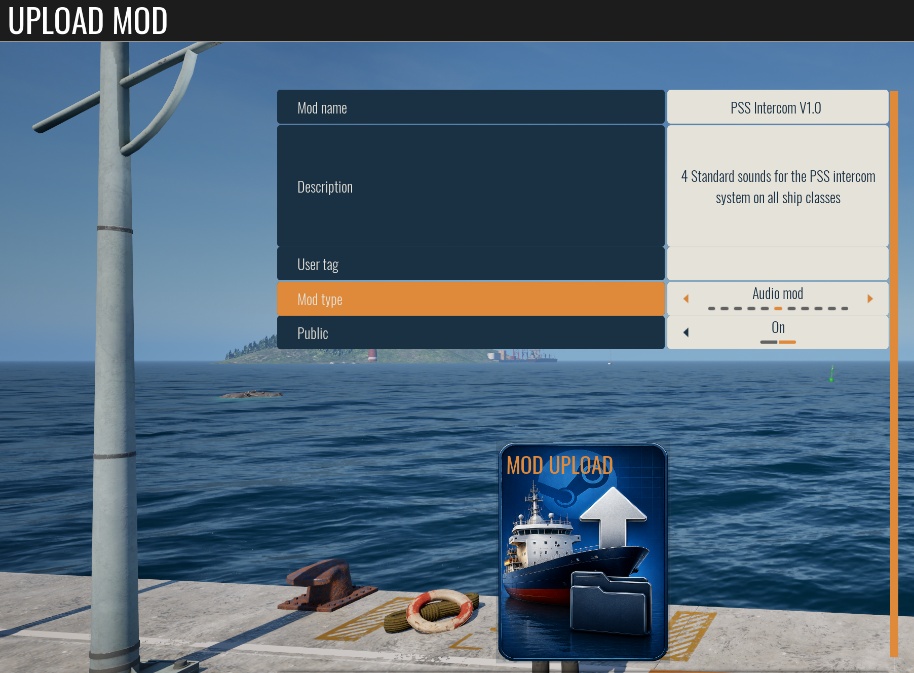
- Go to the mod upload page.
- Enter a mod name, which matches the folder name where your mod data is placed.
- Choose the right mod type (not all mod types are supported right now).
- Click “mod upload”.
- Choose the folder with the exact same name as your previous entered mod name.
- The Application will verify the data and upload the mod to steam.
Table of Contents